AI agent development
AI agents that do the work, and ask before anything risky
An AI agent doesn’t just answer questions. It reads a ticket, checks an invoice against its purchase order, pulls numbers from your database and takes the next step. I build agents for that kind of operations work, with one rule that never bends: anything that costs money or can’t be undone waits for a person on your team to approve it.
Start with a $150 scoping session, credited toward the build · I reply within 24 hours on weekdays
Why most AI agents never leave the demo
Agents are easy to demo and hard to trust. The moment one can refund a customer or pay a supplier, a business needs three things the demo never shows: a record of exactly what the agent did and why, a hard stop on what it shouldn’t do, and a clear number for what each run costs. Without those, nobody signs off on letting it run.
How I build agents a business can sign off on
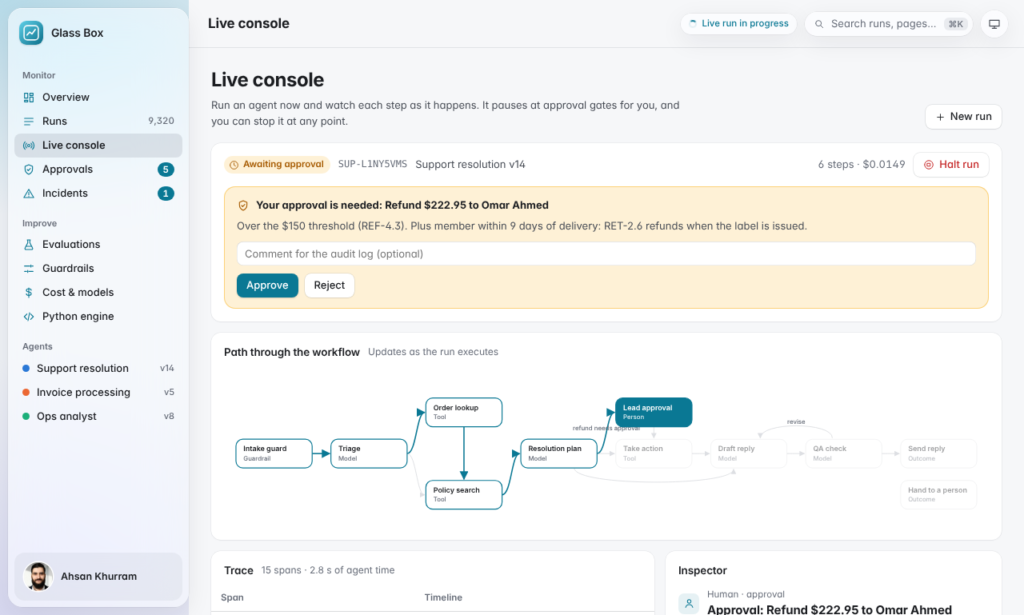
Risky actions wait for approval. A refund over your limit, an invoice that doesn’t match its purchase order, a report going to leadership: the run pauses until someone approves or rejects it, then picks up exactly where it stopped.
The rules live in code, not in the prompt. A prompt can be argued with; code can’t. Card numbers and personal data are masked before any model sees them, suspicious emails are quarantined with every write action switched off, and step and cost limits stop a runaway run.
Every step is traced. You can open any run and see what the agent read, what it decided, why, and what it cost.
Changes are tested before they ship. An evaluation suite of real cases runs after every prompt or model change, so a quiet regression gets caught before your customers see it.
Proof you can inspect: Glass Box
Glass Box is a product I built to show this end to end. Three agents handle support tickets, supplier invoices and business questions answered with live SQL, built in Python with LangGraph behind a FastAPI service. Its 180-case evaluation suite caught a prompt change that quietly broke policy citations and skipped refund approvals, and smarter model routing cut the cost per resolved ticket by about a third. 96 automated tests cover approvals, rejections and outages.
I’ve also built a multi-agent pipeline for normalizing security-log data for a client, and the live sales chatbot in my case studies uses the same pattern: the model gathers what’s needed and calls a separate engine for anything that has to be exact.
Where agents earn their keep
Support teams use them to triage tickets, draft replies from policy and route refunds for approval. Finance teams use them to match invoices to purchase orders and flag what doesn’t add up. Managers use them to ask plain-English questions of their own database and get an answer with the query behind it. If a task is repetitive, rule-based and currently done by copying between tools, it’s usually a good candidate.
What makes an AI agent project quick or slow
Three things set the size of an agent build. The first is how many tools it has to connect to: one helpdesk with a clean API is quick, three systems with spreadsheets in between take longer. The second is how many decisions need a person in the loop, because each approval point needs its own screen, rules and tests. The third is how clean the data is; an agent can only be as reliable as the records it reads. The scoping session looks at all three and turns them into an estimate in hours before you commit to anything.
How an agent goes live without surprises
Agents go live in stages. First they run in shadow mode, drafting what they would do while your team carries on as normal, so you can compare. Then they handle the low-risk steps on their own while everything else waits for approval. Only when the evaluation results and your team agree do the limits move. At every stage the trace shows exactly what the agent did and what it cost, so the decision to give it more room is based on evidence.
What an AI agent project costs
- Scoping session, $150A 60-minute call and a written plan: which workflow, which tools, where approvals sit, an estimate in hours and the main risks. Credited toward the build.
- Fixed written quoteAt $80 to $100 an hour, agreed before work starts.
- Build and evaluatePaid per milestone, each before it starts. You can stop after any milestone.
- HandoverThe code in your repository, a runbook and a recorded call. Then 30 days of fixes and an optional support plan from $250 a month.
AI agent questions
Will the agent act without asking?
Only on the low-risk steps you agree to. Everything above your limits waits for approval, and you set the limits.
Which tools can it work with?
Anything with an API or a database: helpdesks, accounting tools, CRMs, spreadsheets, your own systems. The scoping plan lists exactly what it connects to.
What does it cost to run?
The plan estimates the monthly model cost, and every run is logged with its cost so you can see it.
Do I own it?
Yes, code and accounts are yours once it’s paid for.
How long does an agent build take?
It depends on the number of tools and approval points; the scoping plan gives an estimate in hours before you commit, and you can stop after any milestone.
What happens when a model provider changes or goes down?
The agent fails safely: anything it can’t complete waits for a person, and the model can be swapped because the rules live in code, not in a prompt tied to one provider.
Tell me which workflow you’d hand to an agent
A few lines is enough: what the work is, which tools it touches, and where a person must stay in charge.
Start with the $150 scoping session, credited toward the build.